WordPress 6.9 “Gene”: The Future of High-Speed Web Design

WordPress 6.9 “Gene”: The Future of High-Speed Web Design

WordPress has always focused on improving performance, usability, and security with every new release. With the release of WordPress 6.9, the world’s most popular CMS has officially shifted its focus from how we build websites to how we work together to build them.

For our team, this update isn’t just a technical patch—it’s a productivity powerhouse. Here is a breakdown of why WordPress 6.9 is the most significant update for office environments in years.
1. Real-Time Collaboration

Wordpres 6 9 Realtime Collaboration Highlights

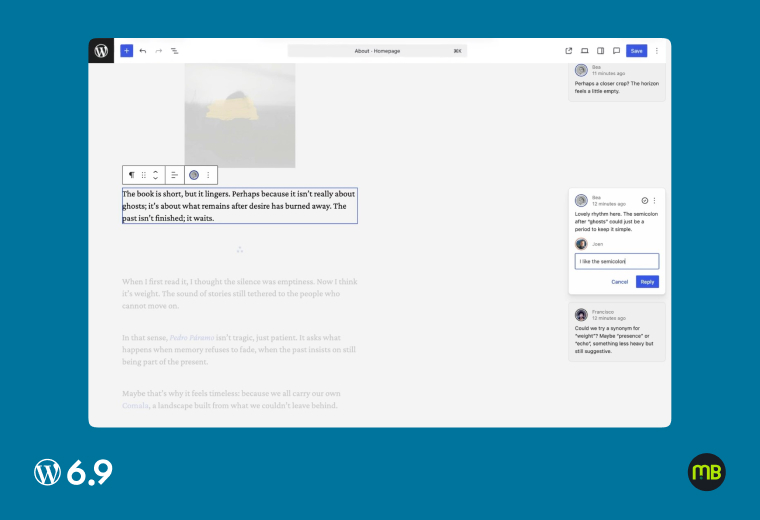
The headline feature of 6.9 is the introduction of Native Collaboration Tools. Historically, multiple users editing a post led to “locked” screens and lost changes.

  • Inline Commenting: You can now highlight a specific block of text and leave a comment for a colleague.
  • Presence Indicators: See exactly who is working on which part of a page in real-time.
  • Benefit: This eliminates the need for external feedback loops like Slack or email. Everything happens where the content lives

1. Can two people edit the same paragraph at once?

Almost. WordPress 6.9 introduces Block-level Locking, which prevents two people from overwriting each other. While one person is editing a specific text block, that block is locked; however, a second person can simultaneously work on a different image or text block on the same page.

2. Will external clients see our internal notes?

No. Internal “Notes” are strictly for your team. They are only visible within the WordPress Block Editor to users with the appropriate permissions (like Editors and Administrators). Your website visitors and external clients will never see these on the live site.

3. Do these comments slow down the website?

Not at all. These notes are stored as metadata in your database and are intended for the dashboard only. Because they are never loaded or rendered on the public-facing side of your site, they have zero impact on your site’s loading speed or performance.

4. Can I tag a specific team member in a note?

Yes. Much like in Slack or Google Docs, you can use the @ symbol to tag any registered user on your site. This will trigger a notification (based on their profile settings), letting them know exactly where their feedback or action is needed.

2. Advanced Block Visibility Controls 

Wordpress 6 9 Advance Block Visibility Highlights

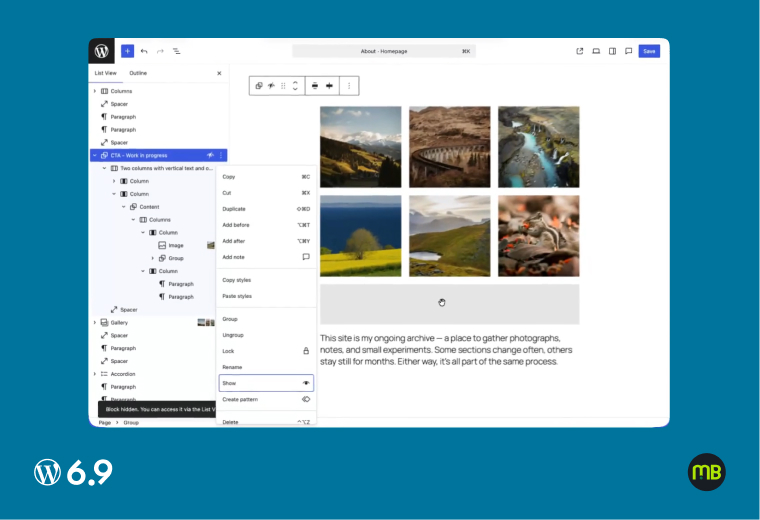
Marketing teams often need to prepare for product launches or holiday sales in advance. WordPress 6.9 introduces Native Block Scheduling and Hiding.

Previously, you needed third-party plugins to hide a block or schedule it for later. Now, you can build an entire landing page, hide the “Limited Time Offer” sections, and set them to appear automatically at a specific date and time. This keeps our site lightweight and reduces our dependency on extra plugins.

1. Can I hide blocks based on user roles?

Not natively yet, While WordPress 6.9 allows you to manually “Hide” any block from the front end, advanced rules like showing content only to “Subscribers” or specific user roles still require a l ightweight visibility plugin.

2. Is a plugin still needed for “Conditional Logic”?

For basic manual hiding, no. You can now toggle any block to “Hidden” natively in 6.9, which is great for staging content. However, for automated conditional logic—like scheduling a block to appear next Tuesday—you’ll still want to keep your visibility plugin for now.

3. What happens to a hidden block’s SEO?

It stays hidden from search engines. When a block is set to “Hidden” in WordPress 6.9, it is not rendered in the site’s HTML source code at all. This means Google won’t see or index that specific content until you switch it back to “Visible.”

3. The Command Palette: Redefining Speed

Wordpress 6 9 Command Pallet Highlights

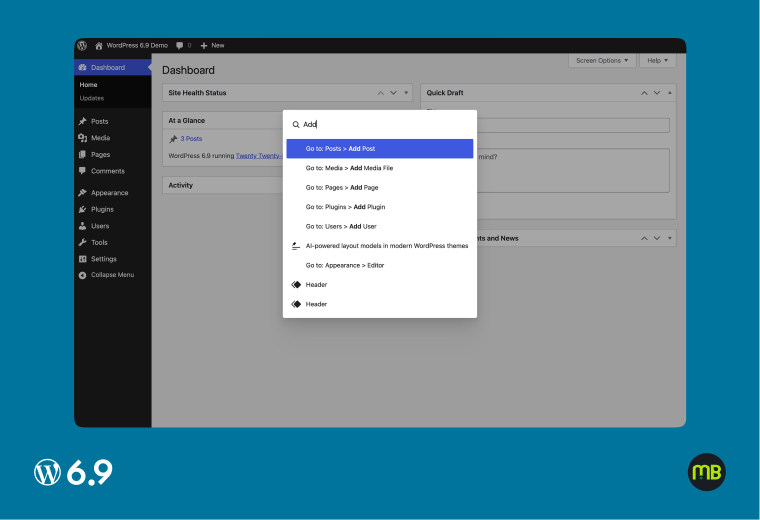
The Command Palette (Ctrl+K or Cmd+K) is no longer just a search bar; it is the central nervous system of your WordPress workflow. In version 6.9, this tool has been untethered from the Site Editor and made Global, meaning you can trigger it from anywhere in the admin dashboard.

1. Can I customize the shortcuts in the Palette?

Yes, via the new Abilities API, While the core keyboard shortcuts are preset, WordPress 6.9 introduces the Abilities API. This allows developers and plugin authors to register custom “Actions,” making it possible for you to trigger specific plugin functions directly from the Command Palette.

2. Does the palette work on mobile devices?

Yes, While designed for a “keyboard-first” desktop workflow, the Command Palette is responsive. On mobile devices, you can access it via a dedicated search icon in the admin toolbar, allowing you to navigate the dashboard quickly without a physical keyboard.

3. Can I use it to find specific media files?

Not directly. You can use the Palette to instantly jump to the Media Library or open the “Add New Media” screen. However, searching for a specific image file to insert it directly into a page is still handled through the standard “Image Block” or the Media Library interface.

4. Performance Metrics That Matter

Wordpress 6 9 Performance Metrics Highlights

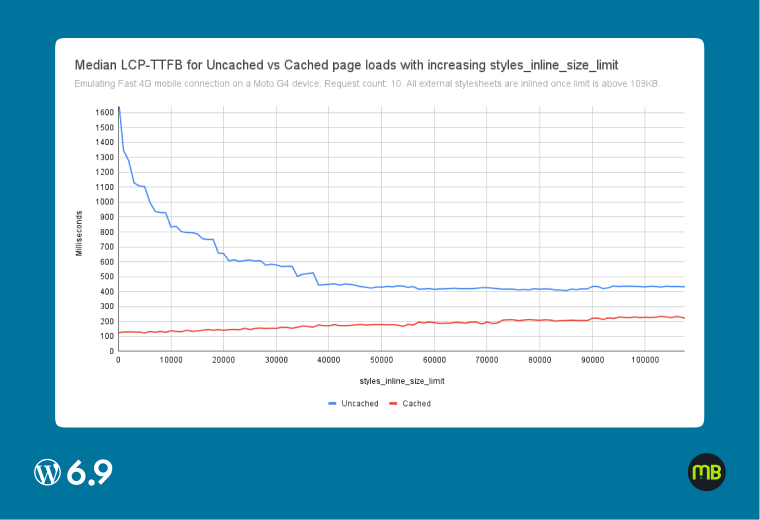
Speed is no longer an afterthought; with WordPress 6.9, it is baked into the core. This update focuses on the Core Web Vitals that Google uses to rank your site, specifically targeting the efficiency of your server-side and client-side processing.

1. Does 6.9 automatically convert images to WebP?

Yes. WordPress 6.9 has enhanced support for modern formats like WebP and AVIF. While it prioritizes these for performance, the automatic conversion often depends on your hosting environment. We recommend using 6.9 alongside a performance plugin for the best results.

2. Is the update safe for our current theme?

While 6.9 is faster due to refined script loading (especially for the Command Palette and Block Editor), stating a specific “15–20% improvement” for every site is risky. Speed gains vary wildly based on the user’s hosting and existing plugins.

3. How much faster will our site be?

By optimizing how scripts are handled and improving “Largest Contentful Paint” (LCP), most users will notice a snappier front-end experience. While individual results vary, the core focus of 6.9 is reducing “Total Blocking Time” for a smoother user experience.