WordPress 7.0 Is Here: Every New Feature Explained

WordPress 7.0 Is Here: Every New Feature Explained

We’ve been building on WordPress since version 5.0. I’ve seen major milestones — the introduction of custom post types, REST API, Gutenberg block editor — and I can tell you with full confidence: WordPress 7.0 is a turning point.

This release officially kicks off Phase 3 of the Gutenberg project, codenamed “Workflows.” After a slower 2025 (marked by governance reshuffles and a deliberate quality-first slowdown), the core team has returned with a release that bundles real-time collaboration, native AI infrastructure, a redesigned admin dashboard, powerful new blocks, and a refreshed developer API all in a single update.
1. Real-Time Collaborative Editing

Real Time Collaborative Editing

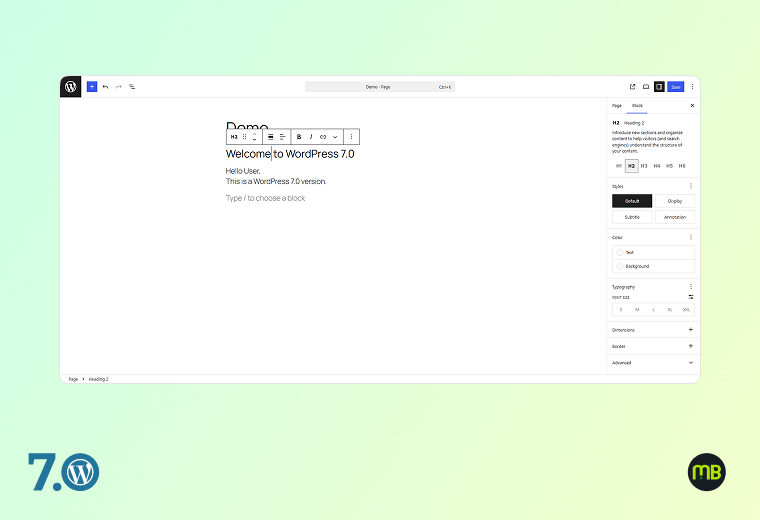
WordPress 7.0 introduces Google Docs-style real-time collaboration directly inside the editor. Multiple users can now edit the same post or page simultaneously, seeing each other’s changes live as they happen.

This is the headline feature of Phase 3 and it’s been years in the making.

Key capabilities included at launch:

  • Live syncing of content changes between multiple editors
  • Offline editing with automatic data sync when you come back online
  • A default HTTP polling sync provider (hosts and plugins can upgrade to WebSocket for faster sync)
  • Stabilised Notes system for inline comments and feedback threads within the editor
  • Keyboard shortcut to add new notes instantly
1.1 How many users can edit the same post at once at launch?

At launch, WordPress 7.0 officially supports two users editing the same post simultaneously. More concurrent users are on the roadmap for future releases.

1.2 Do I need a special plugin to use collaborative editing?

No. Real-time collaboration is built into WordPress 7.0 core. No additional plugin is needed, though it is opt-in during the initial rollout period to allow broad testing.

1.3 What happens if I lose my internet connection while collaborating?

The offline editing feature automatically saves your changes locally and syncs them back once your connection is restored. No data is lost.

1.4 Is the Notes/commenting feature different from regular WordPress comments?

Yes. Notes are internal editorial comments visible only inside the editor by logged-in team members. They are not public-facing comments from site visitors.

1.5 Can my hosting provider improve sync performance?

Yes. The default HTTP polling sync works everywhere, but your hosting provider or a plugin can enable WebSocket support for near-instant real-time sync especially useful for teams making rapid changes.


2. Built-In AI Client & Web Client AI API

Built In AI Client Web Client AI API

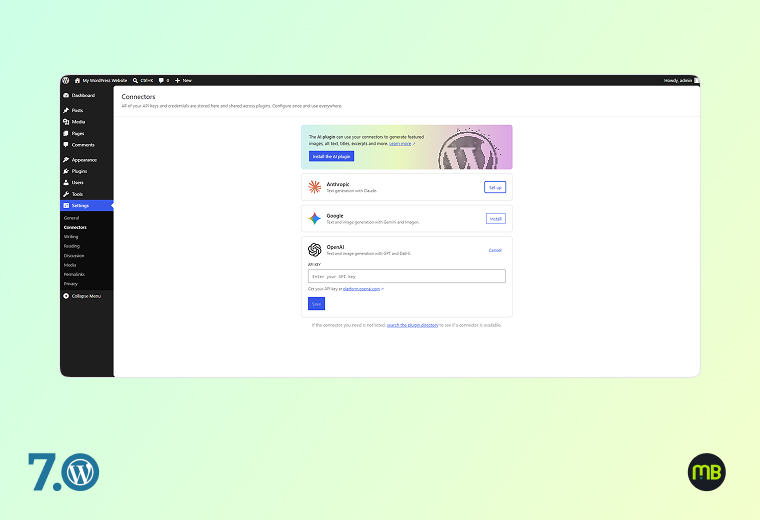
WordPress 7.0 introduces the WP AI Client — a native AI infrastructure layer built directly into WordPress core. This is not a chatbot or a writing assistant. It is a standardised API framework that allows any plugin, theme, or tool to connect to AI models (from any provider — OpenAI, Anthropic, Google Gemini, or others) through a single, consistent interface.

Key components:

  • Web Client AI API: A command centre for accessing generative AI models, with providers remaining external to WordPress core
  • Abilities and Workflows API: New client-side abilities package with filter and search functionality for abilities, and an improved command palette and UI
  • AI Provider Dashboard: Administrators can manage AI provider connections from a centralised settings screen in wp-admin
  • Standardised plugin hooks: Any plugin can now tap into AI models without building its own isolated integration
2.1 Does WordPress 7.0 include a built-in AI writing assistant?

No. WordPress 7.0 introduces AI infrastructure (the WP AI Client API), not a standalone writing assistant. AI writing tools will be built by plugins that use this standardised infrastructure.

2.2 Do I need to pay extra to use AI features?

The WP AI Client API itself is free and part of WordPress core. However, connecting to an AI provider (like OpenAI) will require an API key and may involve costs based on that provider’s pricing.

2.3 How does this affect existing AI plugins like Rank Math AI or Jetpack AI?

Existing plugins will continue to work. As plugin developers update their tools to use the WP AI Client API, they will gain better integration, more consistency, and access to the Abilities and Workflows framework.

3. Redesigned Admin Dashboard & Visual Revisions

Redesigned Admin Dashboard Visual Revisions

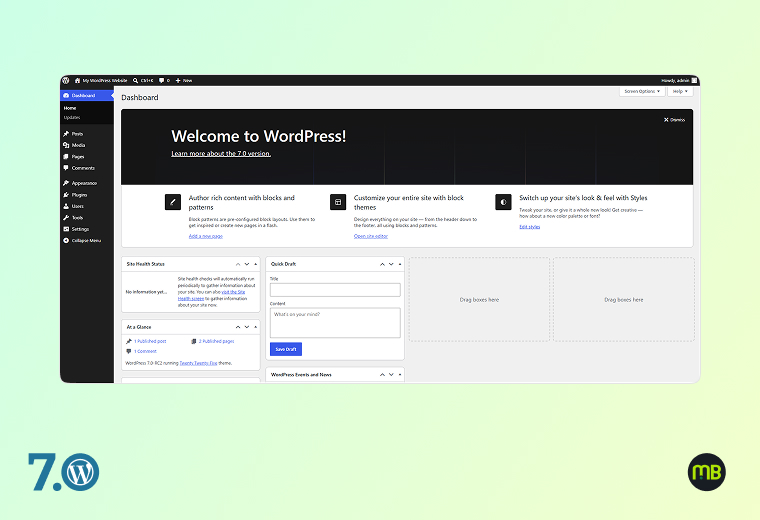
The WordPress admin dashboard receives its most significant visual refresh in years in 7.0:

  • Fresh default colour scheme and updated default styling throughout wp-admin
  • Smoother screen transitions with cross-document view transitions for seamless navigation
  • DataViews replaces WP List Tables — the old table-based content lists are replaced with a modern, app-like interface that feels closer to Notion or Airtable than a 2008 admin panel
  • Visual Revisions: Side-by-side visual comparison of page/post revision versions directly inside the editor — no more trying to read raw text diffs
  • Command Palette shortcut in the Omnibar — a visible Cmd+K / Ctrl+K shortcut visible on every page in wp-admin gives instant access to any tool, post, page, or setting without navigating menus
  • Font Library enabled universally — now available for all themes, so editors can always browse, install and manage fonts regardless of theme support
3.1 Will the new admin dashboard break my existing customisations or plugins?

Most admin plugins will continue working. However, plugins that heavily customise the WP List Tables UI may need updates to work with DataViews. Check for updated versions after the 7.0 launch.

3.2 What is the Command Palette and how does it help?

The Command Palette (Cmd+K on Mac, Ctrl+K on Windows) is a search-driven shortcut launcher built into wp-admin. You can type any command — publish a post, go to settings, create a new page — and execute it instantly without navigating menus.

3.3 How does Visual Revisions help with content approval?

Visual Revisions let you see a rendered visual comparison of two versions of a post or page side-by-side. This makes it easy to spot design changes, formatting shifts, or copy edits that might not be obvious in a text-only diff.

3.4 What is DataViews and why does it matter?

DataViews is a modern replacement for the classic WordPress content list tables (posts list, pages list, etc.). It offers a more flexible, app-like interface with better filtering, sorting, and bulk editing capabilities making content management much more efficient.

4. New & Enhanced Blocks for Content Design

New Enhanced Blocks For Content Design

WordPress 7.0 ships with several new native blocks and major enhancements to existing ones — directly reducing your dependency on page builder plugins for common design needs:

New Blocks:

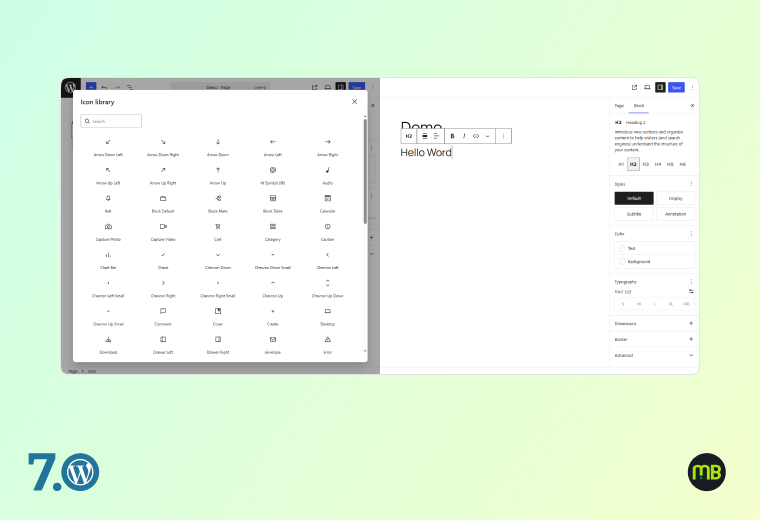
  • Icons Block — Insert scalable vector icons natively, no plugin required
  • Breadcrumbs Block — Create SEO-friendly navigation trails without plugins
  • Heading Block Variations — New heading styles and variation options

Enhanced Blocks:

  • Cover Block — Now supports video embed backgrounds (put a video directly behind your content)
  • Gallery Block — Improved lightbox support for a polished image viewing experience
  • Grid Block — Now fully responsive-enabled with mobile controls
  • Navigation Block — More powerful and user-friendly: create mobile-friendly menus, preview changes in real time, manage links with improved overlays

Responsive Controls:

  • Hide or reveal any block based on screen size (desktop/tablet/mobile) — native in core, no plugin needed

Client-Side Media Handling:

  • Image and video processing now happens in the browser before upload, reducing server load and speeding up media workflows
4.1 Do I still need Elementor or Divi with WordPress 7.0?

For many use cases, 7.0’s native blocks now cover what previously required a page builder. However, if you rely heavily on advanced layout templates, global widgets, or specific visual features from those tools, they remain valid options and are compatible with 7.0.

4.2 How do I use responsive block visibility controls?

In the block settings panel (right sidebar), you’ll find a new “Visibility” option under “Advanced.” Toggle visibility on/off per device type for any block.

4.3 Will my existing Cover Blocks automatically get video backgrounds?

No. The video background option is a new setting you add to existing or new Cover Blocks. Your current Cover Blocks remain unchanged until you edit them.

4.4 Does the Breadcrumbs Block automatically generate structured data?

Yes. The native Breadcrumbs Block generates proper HTML breadcrumb markup that is compatible with Google’s structured data guidelines, supporting BreadcrumbList schema.

5. PHP-Only Block Registration & Developer APIs

PHP Only Block Registration Developer APIs

For developers and technically-minded site owners, WordPress 7.0 ships a suite of powerful new APIs that significantly change how WordPress is extended:

  • PHP-Only Block Registration: Developers can now register blocks using only PHP, with auto-generated inspector controls in the editor — no JavaScript required for basic block creation
  • Block Bindings Updates for Pattern Overrides: Expanded support to custom dynamic blocks, giving much greater flexibility in how synced patterns work with dynamic content
  • Client Side Abilities API: A standardised client-side registry for WordPress capabilities, enabling richer workflows that can be triggered, filtered, and searched
  • PHP minimum raised to 7.4 (8.3+ recommended for best performance)
5.1 Does my site need to be updated to PHP 7.4 before upgrading to WordPress 7.0?

Yes. WordPress 7.0 requires a minimum of PHP 7.4. Sites running PHP 7.2 or 7.3 will not automatically receive the 7.0 update. Check your PHP version in your hosting control panel and upgrade with your host before updating WordPress.

5.2 What is the best PHP version to run with WordPress 7.0?

PHP 8.3 or higher is recommended for optimal performance with WordPress 7.0.

5.3 How do PHP-only blocks affect my current custom blocks?

Existing custom blocks are unaffected. PHP-only block registration is a new option for building blocks — it doesn’t change how existing JavaScript-registered blocks work.

5.4 What are Block Bindings and why should marketers care?

Block Bindings allow a block’s content to be connected (“bound”) to a dynamic data source — like a custom field or an ACF value. Pattern overrides via Block Bindings mean you can have a reusable template layout where the content updates dynamically per post, without duplicating patterns.

The trajectory is clear: WordPress is building toward a fully collaborative, AI-augmented, multilingual publishing platform. For marketing teams, each release will compound the advantages introduced in 7.0.

Update your staging environment today. Verify your PHP version. Review your plugin compatibility. And prepare to take full advantage of what is genuinely the most exciting WordPress release in years.